Library, subscriptions, and queues
The authoritative library stores episode records, Markdown, groups, and state. Subscriptions supply entries; processing creates reading documents. Audio/work caches remain on the transcription computer.
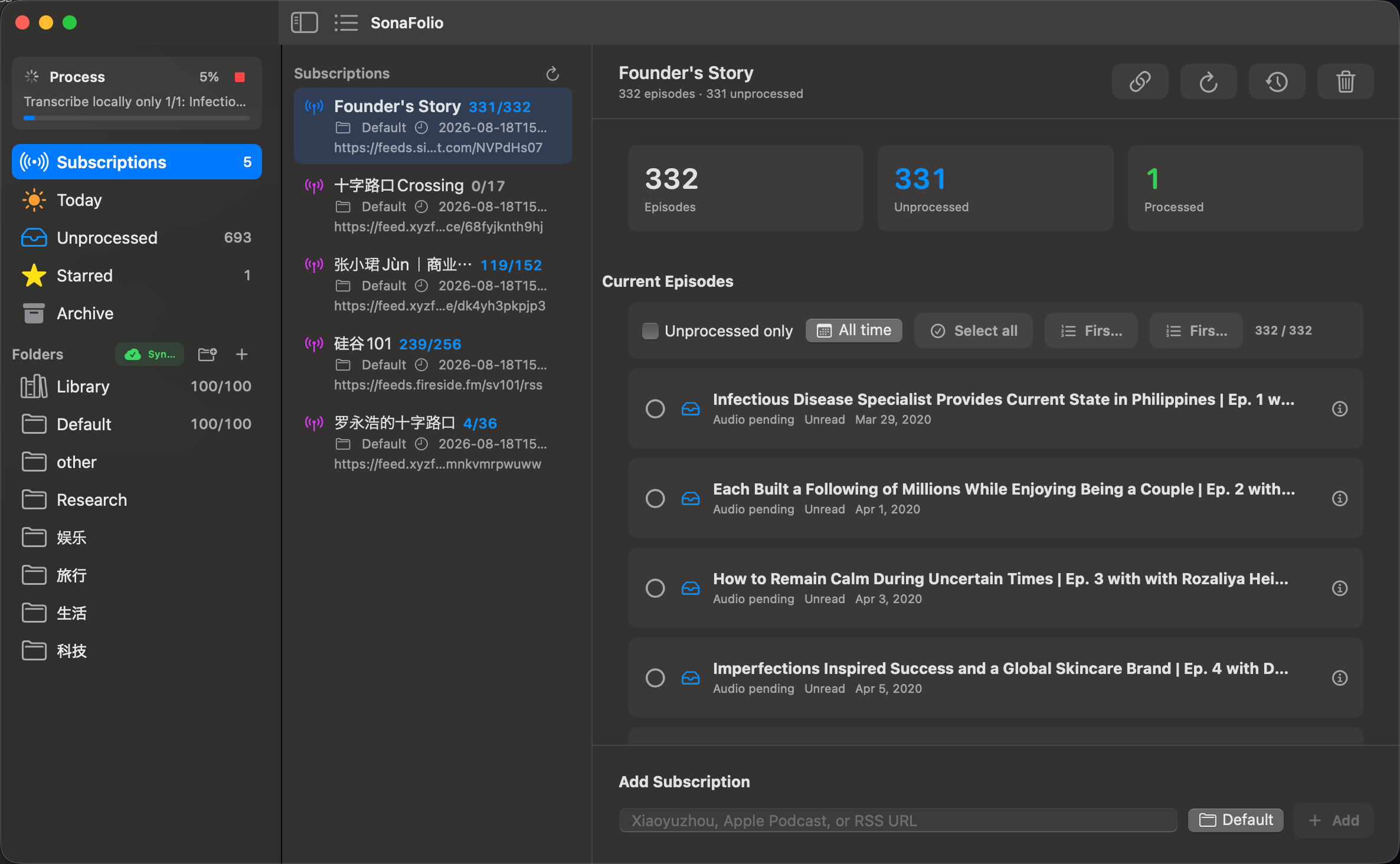
Real current macOS source build. Counts describe the example library, not capacity/accuracy claims. Full image.
Add and refresh
Open Subscriptions, paste RSS/Xiaoyuzhou podcast/Apple Podcasts show into Add Subscription, and choose a group. Refresh updates metadata, not an automatic audio download or complete-series transcription.
atot exec subscriptions add "https://example.org/podcast/rss.xml" \
  --group-name Research --limit 10 --json
atot exec subscriptions list --json
atot exec subscriptions refresh --all --json
atot exec subscriptions refresh --id <subscription-id> --full-history --json
Ordinary CLI import/refresh defaults to 10 entries. Use the returned ID. Full history includes only entries currently exposed by the feed. Refresh is manual; external schedulers can invoke CLI, without a background-polling promise.
Filter and batch
Use totals, Unprocessed only, and time filters, then Select all/Deselect all, current-source First N, or individual rows.
- Pick feed and filters.
- Select/check a limited batch.
- Choose local-only work without cloud keys.
- Wait for results and review QA before the next batch.
Selection does not start processing and some items may be ineligible. Audio pending needs media; old recordings may no longer be available.
Organize and read
Groups organize topics/projects, Starred marks important episodes, and read/archive state manages what to revisit. Today/Unprocessed/group views are not duplicate documents. Group changes do not invoke ASR; read state does not prove verification.
Overview, Transcript, and Summary stay separate. Missing notes need MCP or cloud, not just opening a tab.
Delete or unsubscribe
Unsubscribe stops managing the feed. Episode deletion removes its record/documents and writes a tombstone against silent reimport. Back up needed documents first.
atot exec subscriptions remove <subscription-id> --json
atot exec library episode delete <episode-id> --json
Do not remove internal JSON to force refresh. Tombstones belong to sync/deletion state; back up the complete library.
Share the same library
Settings → Library selects local/iCloud. Default iCloud:
~/Library/Mobile Documents/com~apple~CloudDocs/Audio2Text/Audio2TextLibrary/
Local:
~/Documents/SpeechToTextData/Audio2TextLibrary/
These are different authoritative locations. Weights/media/work remain local; switching locations does not prove that both have identical data. Verify/back up before moving.
iOS Files selects the existing Audio2Text or Audio2TextLibrary folder. It reads/manages documents and subscription metadata, without ASR/audio processing. See iOS.
Check actual data
atot exec library status --json
Compare resolved paths/storage mode, filters, and iCloud file availability when clients disagree.