Desktop workspace
Sources, Episode List, and Detail are the three columns. Swift and Qt share that broad organization, with platform-specific controls. Labels below match the actual interface.
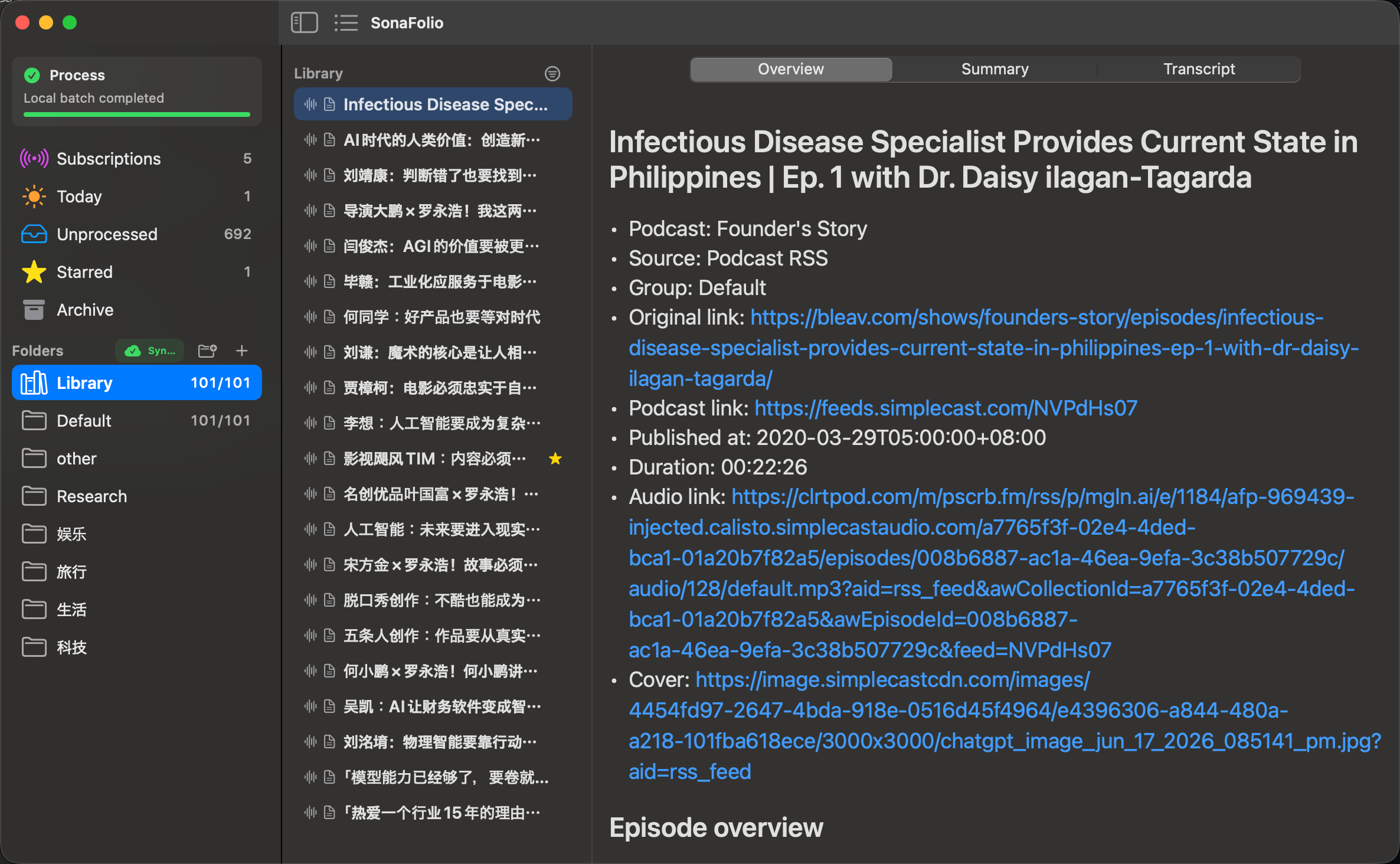
Current source build, with original-language content. Full-size image.
What each column does
| Column | Purpose | Typical action |
|---|---|---|
| Sources | Subscriptions, groups, state filters | Open Unprocessed, Starred, a group |
| Episode List | Choose an item from that source | Select what to read/process |
| Detail | Source and reading documents | Overview, Summary, Transcript |
Overview preserves metadata. Transcript appears after processing; Summary displays existing notes. Opening Summary does not call a model, and an unprocessed import may lack a transcript.
Resize or collapse
Available in source after v0.9.0:
- Drag the divider after Sources horizontally.
- Drag the second divider to resize Episode List.
- Use either leading toolbar button to hide/restore its column.
- Hide both for reading; restore buttons remain accessible.
Expanded widths/visibility are remembered without clearing selection. Minimum widths preserve usable content. macOS also has View → Show All Columns.
| Action | Swift macOS | Qt |
|---|---|---|
| Sources | Control-Command-S | Control-Shift-S |
| Episode List | Control-Command-L | Control-Shift-L |
Older layouts can indicate a release/source difference.
Read and organize
Use item/context actions for favorites, groups, and read/archive state. Read is an organization choice, not proof of processing or verification. Source links stay intact even when list titles are shortened.
Settings → Reading adjusts native font, size, spacing, and width without changing the document. Use New Item then local-only processing for a run without cloud credentials. Logs/cards show stages and failures. Selecting subscription rows or refreshing metadata is not starting ASR; audio can remain pending.
Native macOS shortcuts
| Action | Entry |
|---|---|
| Settings | Command-, |
| New Item | Command-N |
| New Group | Command-Shift-N |
| Local transcription | Command-Return |
| Local reprocess | Command-Shift-Return |
| Generate SRT | Command-Shift-S |
| Refresh | Command-R |
| Refresh Library | Command-Shift-I |
| Agent request | Copy Codex summary write-back instructions |
| Logs | Reveal Logs |
Actions depend on selection, media, and readiness. Check prerequisites when disabled.
Upper-left application status
Processing, cloud tasks, subscription refresh, library synchronization, and cloud connection notices share the upper-left status area. Folders retains group actions only. Sync titles wrap independently instead of competing with folder buttons. Concurrent states remain visible; longer status lists can scroll.
After Sources is collapsed, the native titlebar info button or Qt's Status toolbar action still opens the full panel. Refresh, stop-remaining-task, and result actions remain available. Qt logs open on request from the panel rather than occupying a permanent bottom status bar.
The screenshot on this page comes from an earlier source build; its Folders sync badge is not the latest placement.